Larasynth Topic Guide
This is an in-depth discussion of Larasynth's features and best practices for use. If you have not already, please read and follow along with the tutorial first.
lara Actions
Running lara with no arguments produces this usage message:
Usage: lara <project directory> <action>

Actions:

 config                 - create the project directory if it does not exist and
                          create a larasynth.conf file in the project directory
 record                 - record a training example via a MIDI port
 import <MIDI filename> - create a training example from a MIDI file
 train                  - train a model using the current training example(s)
 perform [-v]           - use one of the trained models to control a
                          synthesizer's continuous controllers during
                          performance
Every lara command needs at least 2 arguments: a project directory and an
action.
Project Directory Structure
After running config on a project directory, it will only contain the file
larasynth.conf. Once you have created at least one training example and
trained at least one network, the folders training_examples and
training_results will be created. You may put other files related to the
project into this directory if you wish, as long as the configuration file and
the two directories mentioned above remain intact.
Here is an example directory structure for a project directory named
project_directory:
project_directory
├── larasynth.conf
├── training_examples
│   └── example-2017-05-29-10:56:38.236683.seq
└── training_results
    └── results-2017-05-29-13:46:04.399845.json
The training example and training results files are stored in plain text formats, but they should not be edited directly.
Creating Training Examples
Without good examples to learn from, Larasynth is useless. The best way to create examples is by using a MIDI sequencer or a digital audio workstation (DAW). Record or edit some notes in your DAW and then go back and record or edit controller changes on top of what you played.
Creating Good Examples
It is important to keep in mind that Larasynth learns to take cues from what you play on your keyboard, and it cannot read your mind. This may sound obvious, but it is easy to forget.
For example, if you want your synth to sound one way when when you play a chromatic line and a different way when you arpeggiate a major chord, there is no way for Larasynth to figure out which one of these you are about to play when you strike the first note. When you strike a second note, Larasynth will know the interval from the first note to the second note, but it still cannot see farther into the future.
Another thing to keep in mind is that before training you must tell Larasynth the default value for each of the continuous controllers that you want Larasynth to control. It is a good idea for each training example to start out with each continuous controller at its default value, and end with it back at its default value.
Start Simple
You may get frustrated if you start by trying to teach Larasynth something complicated before you have a handle on the basic usage.
Try starting with something very simple, like a single note. Create a custom envelope by varying the value of one of your synthesizer's parameters (such as the filter cutoff) over the duration of the note.
Here is a custom envelope that was manually drawn in Ardour:
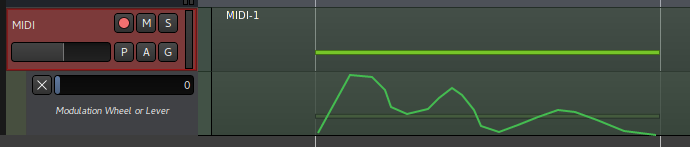
Remember, you will get the best results if the controller value starts and ends at the default value, which in the above example is 0.
Importing and Recording Training Examples
There are two ways to get your training examples from your DAW to your project
directory using lara: the import and record actions. The import action
imports a MIDI file, and the record action records examples in real-time
through a MIDI port.
Before doing either of these, you need to edit the [midi] section of
larasynth.conf and make sure the controllers and controller_defaults
parameters are correct. When importing or recording, the only controller events
that are saved in the training example are those that are for the controllers
listed in the controllers parameter.
Importing MIDI Files
Importing a MIDI file is the easiest way to add a training example. Export from
your DAW to a MIDI file and use the import action.
Recording Training Examples
There are two reasons why you might want to record examples rather than import them:
- Your DAW will not export to a MIDI file
- You would like to create more than one training example from a single project in your DAW and your DAW cannot export selections to MIDI
Like when performing, when recording you will need to connect Larasynth to an existing MIDI port, or have it open a port that your DAW can connect to.
After you start Larasynth recording, it will wait until the first note event before it starts saving events.
To record, set the playback in your sequencer to the beginning of your example, and start Larasynth recording:
$ lara larasynth_project record
Once everything is connected, press play in your sequencer. Once playback is
complete, press ctrl+c in the terminal that lara is running in to stop
recording.
To record another example, run the above command again. Repeat until you have recorded all your examples.
Creating Multiple Examples in One Sequencer Track
If you need to create multiple training examples you can record them into the
same track of your MIDI sequencer, with some silence separating them. For the
first training example, start Larasynth recording, press play in your
sequencer, and then pause sequencer playback during the silence between
examples. Shut down Larasynth with ctrl+c, start Larasynth recording again,
and resume playback in your sequencer for the next example. Repeat for as many
examples as you need to record.
Represenation Configuration
Larasynth works by passing a representation of what is being played on the
keyboard through a neural network. The output of the network is a
representation of what the continuous controller values should be. Both of
these representatons are configurable in the [representation] section of
larasynth.conf.
Update Rate
The input representation is passed through the network at a regular rate. This
rate is configured in the update_rate parameter. This is the number of
updates per second. A faster update rate will allow for more fine-grained
control of the continuous controllers, but it will also make training take
longer and Larasynth will use more of your processor's time during
performance.
Interally, Larasynth uses the update interval, which is calculated by taking
the inverse of the update rate. For example, if your update_rate is 20, then
the update interval is 1 / 20 seconds, or 50 milliseconds.
There are two conditions that will cause Larasynth to pass the input representation through the network to re-calculate the current controller values:
- A "note on" or a "note off" event has just arrived from the keyboard
- The amount of time that has passed since the last update meets or exceeds the update interval.
If there is an update due to the first condition, the controller values are calculated and control change events are sent to the synthesizer before the note event is forwarded to the synthesizer. This means that changing the update rate does not have an affect on latency.
For more on latency, see the Latency section.
Input Features
You must select a subset of the available input representations that Larasynth is capable of. You can use them all if you want, but it is better to omit any input features that are not relavent to your training examples so that Larasynth can learn faster. Here again you must think about what cues your training examples provide.
Here are the 5 input features available:
"some note on"- This indicates whether or not some note is currently depressed on your keyboard."note struck"- This indicates whether or not a note was struck on the keyboard since the last update."note released"- This indicates whether or not a note was released on the keyboard since the last update."velocity"- If a note was struck on the keyboard since the last update, this indicates the velocity (loudness) of the note."interval"- If a note was struck on the keyboard since the last update, this indicates the interval between the previous note and the latest note.
Output Counts
MIDI continuous controller values can range from 0 to 127. Often such a fine resolution is not necessary. For example, you may have a controller that you want to be set at 20 some of the time and set at 80 the rest of the time. If this is the case then you only want Larasynth to have an output count of 2 for that controller.
Larasynth figures out what the minimum and the maximum values of a controller should be based on your training examples. So if controller 1 varies from 20 to 80 over the course of your training examples, it will never set it to a value outside that range.
The output count determines how many possible values within the range Larasynth can output. If the range is 20 to 80 and the output count is 2, Larasynth will only be able to set the controller to 20 or 80. If the output count is 3, Larasynth will be able to set the controller to 20, 60, or 80. If the output count is 61, Larasynth will be able to set the controller to any possible value within that range.
As with controller_defaults, the controller_output_counts parameter is a
comma separated list of numbers which are interpreted as pairs of controller
numbers and counts.
So if Larasynth is to control controllers 1 and 2, you could configure it like so:
controller_output_counts =
    1, 2,
    2, 10
This gives controller 1 an output count of 2, and controller 2 an output count of 10.
Keep in mind that using higher output counts leads to more complex networks, which can increase training time and increased latency during performance.
Training Configuration
Larasynth is trained by creating training sequences from your training examples. A training sequence is a series of input/output pairs which represent updates over time. The input is an array of values which represent the current state of the keyboard (the values of the input features) and the output is an array of values that represent the desired values that the continuous controllers should have, based on the examples.
These sequences are passed through the neural network. For each update in the training sequence the network makes a prediction as to what the controller values should be and the predicted values are compared to the desired values. If the network predicts wrong, it is adjusted slightly so that in the future it is more likely to predict correctly.
Many things about this process are configurable in the [training] section of
larasynth.conf.
Silence Padding
When Larasynth assembles your training examples into a training sequence, it adds a period of silence to the beginning of each example. This is so that the neural network must use your note events as cues to change the controller values rather than relying purely on time. It also allows Larasynth to learn what to do when you are not playing anything.
The amount of silence added is random, and the random values used to determine
the amount of silence are generated from a normal distribution. The
mean_padding parameter specifies the average number of seconds of silence to
add. The padding_stddev specifies the standard deviation.
For example, if you set mean_padding = 1.0 and padding_stddev = 0.1
then on average it will add 1 second of silence padding. The majority of the
time the silence will be between 0.9 and 1.1 seconds, but shorter and longer
periods of silence are possible as well.
If you have a simple training example, such as a custom envelope for a single
note, you may want no silence some of the time. In this case you could set
mean_padding = 0.1 and padding_stddev = 0.1 or something similar.
Repetitions
Each training sequence may contain repetitions of each training example. If you
have 2 training examples and you set example_repetitions to 2, then each
training sequence will be created by taking 2 copies of each training example
to create 4 examples, and then shuffling these 4 examples to create an ordering
for the sequence.
Every so often during training there will be a validation sequence presented to the network. During validation the network will not be changed at all, the trainer is simply assessing how accurate the network is in its current state.
The number of repetitions during validation is configured separately in the
validation_example_repetitions parameter. This value should generally be
greater than or equal to example_repetitions.
Varying the Tempo
When you are performing you will not strike and release notes with precisely the same timing as they were struck and released in the training examples due to human limitations. Thus Larasynth may need to learn to tolerate variations in overall tempo and minor fluctuations in tempo from note to note. This is accomplished by applying random timing variations to each distinct training sequence.
The tempo_adjustment_factor parameter specifies how widely the overall tempo
may vary from sequence to sequence. The tempo_jitter_factor specifies
how widely the amount of time may vary note to note.
For both of these parameters, keep the value at 0.0 if you do not want any
tempo adjustments during training. The maximum value for both is 1.0. This
will vary the tempo to up to twice as fast or twice as slow as the original
tempo.
For single-note training examples it is appropriate to keep both of these
values at 0.0.
Resetting Training Sequences
If Larasynth is being trained with a training sequence and its predictions are currently very inaccurate, it is usually not productive to continue with that training sequence. Instead, the sequence should be abandoned early on when it is clear that its predictions are going to be consistently inaccurate.
However, you may have created training examples with small inconsistencies that Larasynth will not be able to learn exactly but it should be able to be "close enough". If that is the case, you want Larasynth to continue training on a training sequence if there are minor errors or just a small streak of errors.
After each update within a training sequence, the squared error of the
controller value predictions is calculated. If the target value for a
controller was 53 and the network predicted it should be 51, that is an error
of -2, and a squared error of 4. The squared_error_failure_tolerance
parameter defines a maximum value for the sum of the squared errors at which a
prediction can still be considered correct.
For example, if Larasynth is controlling 2 different controllers and
squared_error_failure_tolerance is set to 5, then it will allow one
controller to be off by 1 (squared error of 1) and the other controller to be
off by 2 (squared error of 4) since the sum of the squared errors
is 5. However, it will not allow both controllers to be off by 2, since the sum
of the squared errors would be 8.
The consecutive_failures_for_reset parameter specifies how many times in a
row the network's prediction must be wrong outside of the failure tolerance
before it resets the training sequence.
The reset_probability parameter specifies the probability that the sequence
will actually be reset if the above reset conditions are met. If this value
is 1.0 then the sequence will always be reset when the reset conditions are
met. If the value is 0.0, the sequence will never reset (not advised). Setting
it somewhere in the middle will occasionally allow the sequence to continue a
little longer before resetting.
Training Epochs
Each presentation of a training sequence is called a training epoch.
The epoch_count_before_validating parameter specifies the number of epochs to
wait before presenting a validation sequence. Validation will also occur when
the network gets more consecutive predictions correct in a row than ever
before.
When a validation sequence is presented, the mean (average) of the squared errors from each update is calculated. The mean squared error (MSE) is used to determine how well the network is trained. An MSE of 0.0 means that the network has learned to reproduce the output of your training examples perfectly.
The mse_threshold parameter defines a MSE level that is "good enough." If the
MSE is at this level or lower after validation, training will stop.
The max_epoch_count parameter specifies the maximum number of training epochs
that will be performed before training shuts down.
Training
Once the configuration parameters have been set, you can start training like so:
$ lara larasynth_project train
Training will continue until any of these conditions are met:
- The MSE threshold is hit
- The maximum number of training epochs has been performed
- You press
ctrl+cin the terminal running Larasynth
How Long will Training Take?
This question is impossible to answer as it depends on many factors including the speed of your computer, the complexity of your training examples, how you have configured Larasynth, and whether or not it is even possible for Larasynth to learn what you want to teach it.
It is possible to achieve an MSE of 0 in less than a minute for simple training examples (such as the one in the tutorial), more complex training examples could take hours to learn, and for some examples the network may never learn well enough to be considered satisfactory.
Another factor is that each new network is randomly intialized, and some of these random initial states end up learning better than others. You may find it useful to train more than one network simultaneously, up to the number of CPU cores on your machine, since one of them might learn better than the others.
Each time you train, the best result will be saved. None of your past results will be overwritten, so you can feel free to train as many times as you like to try to achieve a better result.
If you are not having success, first you must think about your training examples. Do they contradict each other? Do the controller changes "react" to distinct note events, or are you trying to get Larasynth to "read your mind"? Can you express what you want Larasynth to learn in simpler terms?
If you are confident that Larasynth should be able to learn from your examples, then you can start tweaking the training parameters.
Also remember that you do not always need to achieve an MSE of 0.0 in order to have a sufficiently well trained network. If you think the MSE might be low enough, try performing with it and see what happens.
Latency
In a MIDI performance system, an event message is generated by an action (such as pressing a key on a keyboard), the the message is sent to a synthesizer, and the synthesizer reacts to the message accordingly. The amount of time between the action and the reaction to the event is called latency. In other words, the higher the latency, the more delay there will be between a musician pressing a key and a sound being played.
Latency is inevitable in any MIDI system, as it is impossible to send a message instantly. Acceptable levels of latency vary from musician to musician, but most people will start noticing the latency when it reaches around 10 milliseconds.
When using Larasynth, the MIDI messages must be processed before they are passed on to the synthesizer, which increases latency. The processing involves several steps:
- The message is examined to see if it is a NOTE ON or NOTE OFF message. All other messages are dropped.
- The values of the input features are updated based on the content of the message.
- The input features are passed through the neural network.
- The output of the network is translated to controller values.
- If the new controller values are different from the old controller values, control change messages are sent to the synthesizer.
- The original message is sent to the synthesizer.
The most costly of these steps is number 3, when the features are passed through the neural network. The larger the network, the longer this step takes, and the more latency will be added. For smaller networks (50 blocks or less) the added latency for all of these steps will typically be less than a millisecond on a modern laptop. For larger networks (around 200 blocks) the added latency will be several milliseconds.
When performing with the -v option, latency information is printed to help
you get a sense of how much latency Larasynth is contributing to your
system. Keep in mind that this is only the latency added from processing the
event. It does not take into account the latency that is added due to the
overhead of an extra MIDI routing hop that your computer's audio system must
handle.